Is it safe to link your bank account to an app?
Usually yes, if you choose the app with care. Here's how a bank link works, what an app can and can't do with it, the rules that protect you, red flags to watch for, and how to see and turn off access any time.

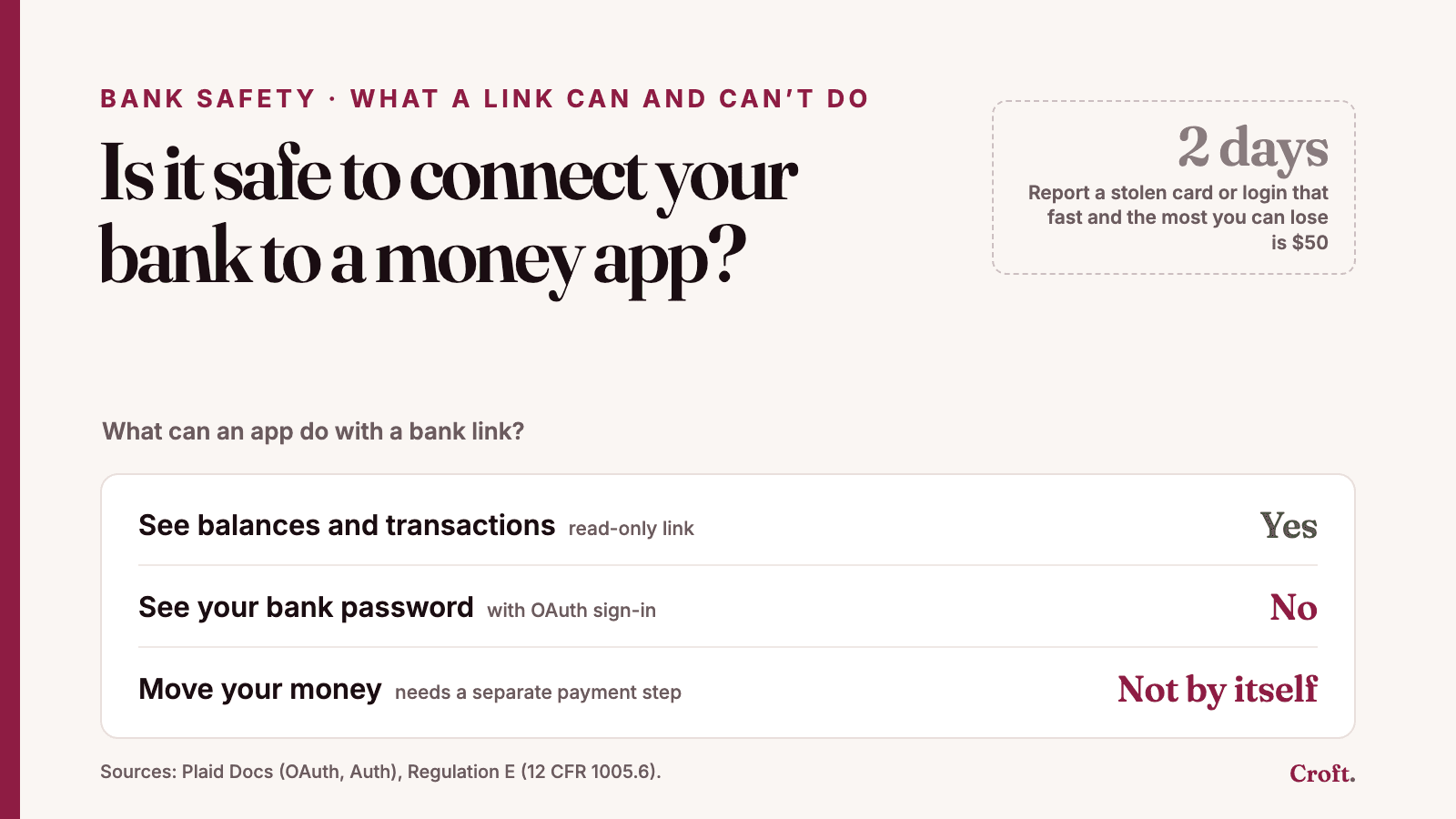
Yes, for most people, linking a bank to a money app is safe, if you pick the app with care and keep an eye on it. In most cases the app gets a key that lets it read your accounts. That key alone can't move your money. You can turn it off any time from your bank's website or from Plaid's own site.
The real risks are a little different from what most people fear. They're apps you don't really know, scams that ask for your login, and old links you forgot about. This post shows how a bank link works, which rules protect you, and a short list to check before you connect.
How a bank link works
Most money apps don't connect to your bank on their own. They use a go-between, called a data aggregator. Plaid is one of the biggest. When you tap "link my bank," a Plaid window opens inside the app. You pick your bank there [1].
What happens next depends on your bank. There are two ways it can go.
1. You sign in at your bank (this is called OAuth). The window sends you to your bank's own website or app. You sign in there, and you pick which accounts to share. You might share checking but not a credit card. Then you come back to the money app. The app never sees your password [2]. In the US, many larger banks work this way, including Chase, Wells Fargo, Bank of America and Capital One [2].
2. You type your bank login into the Plaid window. Some banks don't offer OAuth yet. Then you type your bank username and password into the Plaid window. Plaid says it doesn't share that username and password with the app [1].
Either way, the app ends up with a token. A token is a long code that stands in for your login. The app uses it to pull your balances and transactions again later. A Plaid token doesn't run out on its own. It works until the link is removed [3]. That's why the app has to keep it safe, and why it's worth removing links you no longer use.
What an app can and can't do with that access
An app can only get the kinds of data it asked for, and that you agreed to in the window. The most common kind is read-only: balances, transactions and, for loans and cards, what you owe.
Moving money is a separate step. Some apps ask for your account and routing numbers so they can send or pull money, for example to pay a bill from your bank. Even then, Plaid says its account-number product doesn't move money by itself. The app also needs a payment company to make the transfer [4]. So if an app only shows you charts and plans, it has no reason to ask for that.
Your data is a different question from your money. An app that reads your transactions learns a lot about you. What it may do with that data is set by its privacy policy and by federal law (more on that below). So read what the app says it does with your data, not just how it connects.
The rules that protect you
Your bank account: Regulation E
If money leaves your bank account in an electronic transfer you didn't allow, a federal rule called Regulation E limits what you can lose. How much depends on how fast you tell your bank [5]:
Your card or login was lost or stolen. Tell your bank within two business days after you learn of it, and the most you can lose is $50. Wait longer, and it can be up to $500.
A transfer you didn't make shows up on your statement. Tell your bank within 60 days after the statement was sent. If you wait longer, you could be stuck with transfers made after those 60 days.
If no card or login was lost or stolen, the $50 and $500 limits don't apply. You owe nothing for those transfers, as long as you report them within the 60 days [6].
Two more points matter here. If a scammer tricks you into sharing your login, the CFPB says the transfers they make still count as unauthorized. Being careless, like writing your PIN on your card, doesn't take away your protection either [7]. But if you knowingly give a person your card or login, the transfers they make may not count as unauthorized. That stays true until you tell your bank that person no longer has your OK [8].
Your data: the Gramm-Leach-Bliley Act
This federal law covers companies that offer financial products or services, not only banks. It makes them tell you how they share your information and let you opt out of some sharing. It also makes them keep a security program to protect your information [9].
Open banking: the CFPB's data rights rule
In October 2024, the Consumer Financial Protection Bureau (CFPB) finished a rule under Section 1033 of the Dodd-Frank Act. It would make banks share your data, when you ask, with you and with apps you approve, in a safe way. It also set privacy duties for the apps that get the data [10].
That rule is on hold. In August 2025, the CFPB asked for comments on changing it [11]. In October 2025, a federal court in Kentucky blocked the CFPB from enforcing the rule until it finishes that review [12]. As of October 29, 2026, the CFPB had not published a new version in the Federal Register [13]. So for now, the protections above, plus each app's own promises, are what you have.
FDIC insurance doesn't cover apps
FDIC insurance protects money you keep at an insured bank, up to at least $250,000, if the bank fails. It doesn't cover the app. In the FDIC's words, "nonbank companies themselves are never FDIC-insured." And if a nonbank app that holds your money goes bankrupt, FDIC insurance doesn't protect you from that [14].
For an app that only reads your data, this changes nothing. Your money stays at your bank, and your bank is still insured. It matters when an app holds money for you, like a cash account inside the app. Then ask which bank holds the money, and check that bank on the FDIC's BankFind tool [14].
Red flags
Someone asks for your login or a code by text, email or phone. Your bank won't ask you for a verification code. The FTC says: "Never share a verification code. Ever." [15]
Someone tells you to move your money to keep it safe. That's a scam every time [15].
You reached the app through a link in a surprise message. Go to the company's real site or app store page yourself instead [16].
The app wants your bank password typed into its own page, not into your bank's site or a known connection window.
The app asks to move money when it only needs to read. A budget or planning app shouldn't need to pull money from your account.
"FDIC-insured" with no bank named. Ask which bank holds the money [14].
No privacy policy, or one that doesn't say what the app does with your data.
A checklist before you connect
Know who made the app. Find the company's name and its privacy policy.
Read what it says about your data. Does it sell it or use it for ads? Can you delete it?
Use your bank's own sign-in if you're offered one, and share only the accounts the app needs [2].
Check what it asks for. Read-only, or the power to move money? Does that fit what the app does?
Turn on two-step sign-in at your bank and in the app. It makes it harder for someone to get in, even if they have your password [16].
Turn on bank alerts for big withdrawals, so you spot a problem within the time limits above.
How to see and turn off access
You can stop sharing at any time [17]. There are three places to do it.
In the app. Look for "disconnect," "unlink" or "remove bank" in its settings. When an app removes a Plaid link, the token stops working for good [3].
At your bank. If you linked by signing in at your bank, look in your bank's website or app for a list of connected apps. Many of these banks let you remove an app's access there [2].
At Plaid. Plaid has a free site called Plaid Portal, at my.plaid.com. There you can see the apps you've linked through Plaid, disconnect them, and delete your data from Plaid [1] [18].
Once a year, it's worth a quick look. Remove anything you don't use anymore.
How Croft handles this
Here's what Croft does, in plain words.
Croft links through Plaid. You type your bank login into Plaid, or into your bank's own page. Croft never sees or keeps your bank password.
Read-only. Croft reads balances, transactions and what you owe on loans and cards. It can't move your money.
Two-step sign-in comes first. Croft has no password of its own. You sign in with Google or a one-time code we email you. Then you set up a second step, like a code sent to your phone, before you can link a bank.
Your bank key is locked. The Plaid token is encrypted when it's stored (AES-256-GCM).
You can leave any time. Unlink a bank in Croft, and Croft tells Plaid to turn off that link. Or delete your account in Settings › Privacy & data. Croft then disconnects every bank and deletes your personal and financial data, usually within minutes.
No selling. Croft doesn't sell your personal or financial data, and it doesn't use your financial data for ads.
Croft isn't a bank and doesn't hold your money, so FDIC insurance isn't part of the picture. Your money stays at your bank.
The short version
Linking your bank to a well-known app usually gives it a key to read, not to spend. Use your bank's sign-in when you can, and never share a code with anyone who contacts you. Remove links you don't use. And if money ever leaves your account that you didn't send, tell your bank fast. The 2-day and 60-day limits matter.
Sources
Plaid, "How Plaid works for consumers." Fetched October 29, 2026. https://plaid.com/how-it-works-for-consumers/
Plaid Docs, "OAuth Guide." Fetched October 29, 2026. https://plaid.com/docs/link/oauth/
Plaid Docs, "Item endpoints" (access_token; /item/remove). Fetched October 29, 2026. https://plaid.com/docs/api/items/
Plaid Docs, "Auth." Fetched October 29, 2026. https://plaid.com/docs/auth/
12 CFR 1005.6, Liability of consumer for unauthorized transfers (Regulation E), Consumer Financial Protection Bureau. https://www.consumerfinance.gov/rules-policy/regulations/1005/6/
Official interpretation of 12 CFR 1005.6, comment 6(b)(3)-2, Consumer Financial Protection Bureau. https://www.consumerfinance.gov/rules-policy/regulations/1005/Interp-6/
Consumer Financial Protection Bureau, "Electronic Fund Transfers FAQs," questions 5–7 (updated June 4, 2021). https://www.consumerfinance.gov/compliance/compliance-resources/deposit-accounts-resources/electronic-fund-transfers/electronic-fund-transfers-faqs/
12 CFR 1005.2(m) and comment 2(m)-2, definition of unauthorized electronic fund transfer, Consumer Financial Protection Bureau. https://www.consumerfinance.gov/rules-policy/regulations/1005/2/
Federal Trade Commission, "Gramm-Leach-Bliley Act." https://www.ftc.gov/business-guidance/privacy-security/gramm-leach-bliley-act
Consumer Financial Protection Bureau, "Required Rulemaking on Personal Financial Data Rights," final rule, Federal Register (November 18, 2024; issued October 22, 2024). https://www.federalregister.gov/documents/2024/11/18/2024-25079/required-rulemaking-on-personal-financial-data-rights
Consumer Financial Protection Bureau, "Personal Financial Data Rights Reconsideration," advance notice of proposed rulemaking, Federal Register (August 22, 2025). https://www.federalregister.gov/documents/2025/08/22/2025-16139/personal-financial-data-rights-reconsideration
Moore & Van Allen, "CFPB Enjoined From Enforcing Personal Financial Data Rights Rule 1033" (November 13, 2025), on the October 29, 2025 order in Forcht Bank, N.A. v. CFPB, No. 5:24-cv-00304 (E.D. Ky.). https://www.mvalaw.com/data-points/cfpb-enjoined-from-enforcing-personal-financial-data-rights-rule-1033
Federal Register, CFPB documents matching "personal financial data rights," newest first (searched October 29, 2026; latest rule document is the August 22, 2025 notice). https://www.federalregister.gov/documents/search?conditions%5Bagencies%5D%5B%5D=consumer-financial-protection-bureau&conditions%5Bterm%5D=%22personal+financial+data+rights%22&order=newest
FDIC, "Banking With Third-Party Apps" (May 31, 2024). https://www.fdic.gov/consumer-resource-center/2024-06/banking-third-party-apps
Federal Trade Commission, "Got a call about fraud activity on your bank account? It could be a scammer" (2024). https://consumer.ftc.gov/consumer-alerts/2024/06/got-call-about-fraud-activity-your-bank-account-it-could-be-scammer
Federal Trade Commission, "How To Recognize and Avoid Phishing Scams" (September 2022). https://consumer.ftc.gov/articles/how-recognize-and-avoid-phishing-scams
Plaid, "Safety." Fetched October 29, 2026. https://plaid.com/safety/
Plaid, "End User Privacy Policy" (effective December 8, 2025). https://plaid.com/legal/